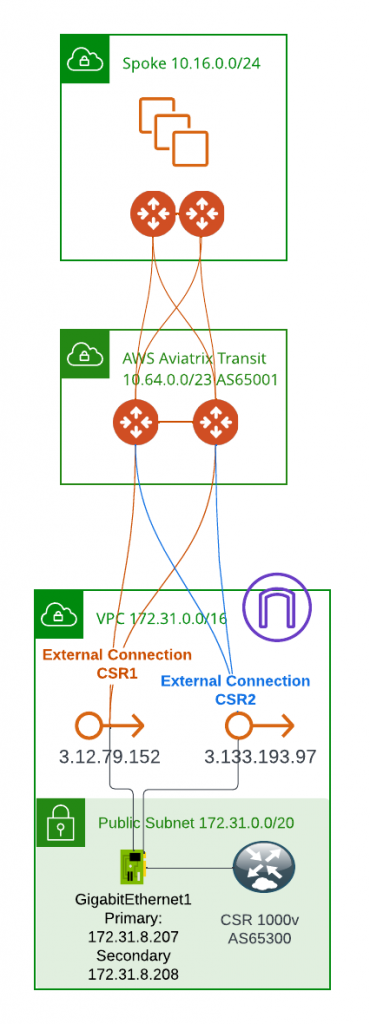
Aviatrix Gateways – Spoke, Transit, CloudN, and Edge – offer a simple and efficient way to establish highly available and high-performing data planes. With the Aviatrix Controller, multiple encrypted tunnels can be automatically created, ensuring seamless redundancy and fast throughput. By deploying a pair of gateways at each end, Aviatrix builds four full mesh tunnels, creating a reliable data path with up to 5Gbps of throughput. But what makes Aviatrix truly stand out is its patented High Performance Encryption, which leverages multiple IP addresses and CPU cores to create multiple IPSec tunnels. This unique approach can achieve up to 70Gbps throughput, delivering exceptional performance.
However, not all customers are ready to implement CloudN or Edge. For these situations, Aviatrix still provides encryption and the ability to create multiple IPSec tunnels for higher throughput. In this blog post, we will delve into how to achieve this and explore the benefits of using Aviatrix Gateways for highly available and high-performing data planes.
As the number of customers onboarding to GCP Google Cloud Platform continues to grow, one of the most common questions asked is how to access GCP Global Services, such as Cloud SQL, privately and securely. The unique features of GCP networking, including the global VPC construct, single route table for all subnets, and regional Cloud Routers, can be challenging for enterprise customers seeking to access GCP global services. In this blog post, I will demonstrate how Aviatrix architecture enables customers securely and efficiently access GCP global services.
In our last blog, “AWS Hybrid Architecture and Edge 2.0,” we covered the workflow of registering an Edge 2.0 gateway, attaching it to Aviatrix Transit, and forming a BGP peering with on-premise devices. Now, let’s take a closer look at the features of the Edge 2.0 gateway. By leveraging Edge 2.0, enterprises gain high throughput and intelligent packet processing capabilities at the edge of their network. Edge 2.0 provides a robust set of features, including intelligent packet routing to streamline network traffic and advanced security features, such as network segmentation, to provide an added layer of protection to your network.
One of our customers approached Aviatrix in search of a high-performance encryption solution for their on-premise data centers and AWS. They were impressed with Aviatrix’s features, including visibility, a dedicated data plane, high-throughput encryption, and Terraform capability. However, they also had sister business entities still using AWS TGW, and didn’t want to spend too much time trying to convince them to switch to Aviatrix. That’s when they turned to us for a hybrid architecture solution.
Recently we were helping customer to launch Spoke Gateways in their AWS account, after 10 minutes launching the gateway, the gateway creation were reverted and following errors generated
Error: [AVXERR-TRANSIT-0119] Failed to launch gateway test. Instance i-0005da0797da40ae8 could not be started. Delete the gateway test to clean up resources and try again. It is possible that gateway size t3.small is not supported in the region us-east-1 or EBS encryption KMS CMK Key policy Key administrators and users are not updated with your Aviatrix APP role and Aviatrix EC2 role.
As enterprises increasingly strive to simplify their Multi-Cloud Networking Management, Aviatrix’s MCNA (Multi-Cloud Networking Architecture) has emerged as a leading solution. The MCNA offers a standardized and flexible multi-cloud networking infrastructure that spans regions and clouds with ease. When combined with Aviatrix Edge, enterprises benefit from a dynamic and dedicated data plane, and a wealth of day-2 operational enhancements, including deep visibility, auditing, and troubleshooting capabilities. The standardized and intelligent networking helps bridge skill gaps and advanced security features provide an extra layer of protection to the network. It’s no wonder that so many organizations are turning to Aviatrix’s Multi-Cloud Transit architecture.
However, for organizations that have already deployed cloud networking solutions, the migration process can be perceived daunting, with the fear of risk and the possibility of wanting to revert back to their previous architecture.
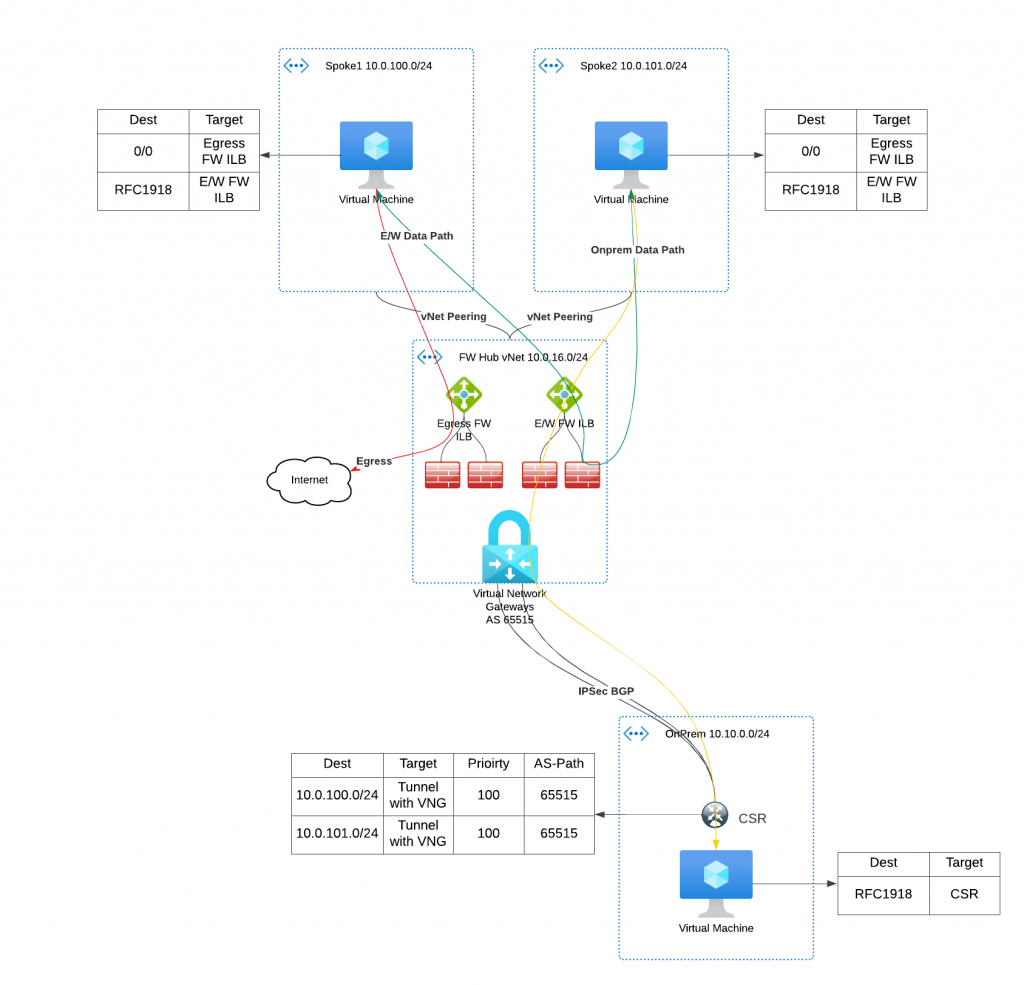
In this blog post, I will guide you through the process of migrating from an Azure native vNet hub and spoke architecture to Aviatrix Transit. I will show you how to do so seamlessly and with minimal risk, ensuring a smooth transition to the advanced features and benefits of Aviatrix MCNA.
Azure only support IPSec, not GRE as tunneling protocol
On-premise device must be able to support BGP over IPSec, also it is manual process to build/maintain IPSec tunnels from on-premise device.
Express Route to Aviatrix Transit – Option 2, where we utilize Azure Route Server and some smart design to bridge the BGP between Aviatrix Transit, Azure Route Server and ExpressRoute Gateway, then towards on-premise device. This solution have fpllowing constrains:
ARS can only exchange up to 200 routes with ERGW
No end to end encryption between on-premsie towards Aviatrix Transit, only MACSec can be used between on-premise devices towards Microsoft Enterprise Edge router.
Additional architecture complexity/cost and lose operational visibility, also this solution is in Azure only, means you will end up with different architecture in different clouds.
For enterprises moving business critical applications to multi-cloud, needing point to point encryption without sacrificing the throughput, looking for unified solution that can provides enterprise level visibility, control, audibility, standardization and troubleshooting toolsets. Neither above two solution would be ideal. IPsec is industry standard utilized by all Cloud Service Providers, but how are we able to overcome it’s limitation of 1.25Gbps per tunnel?
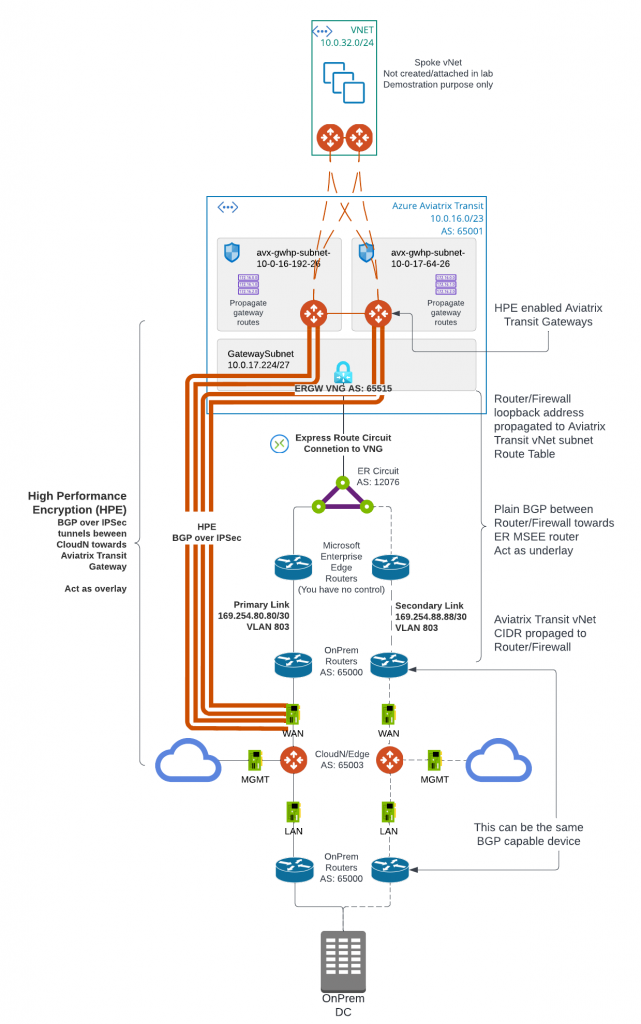
Aviatrix’s winning formular solves these challenges with it’s patented technology called High Performance Encryption (HPE). It automatically builds multiple IPSec tunnels over either private connectivity such as express route, or over Internet. Aviatrix then combine these tunnels into a logical pipe, to achieve line rate of encryption up to 25Gbps per appliance.
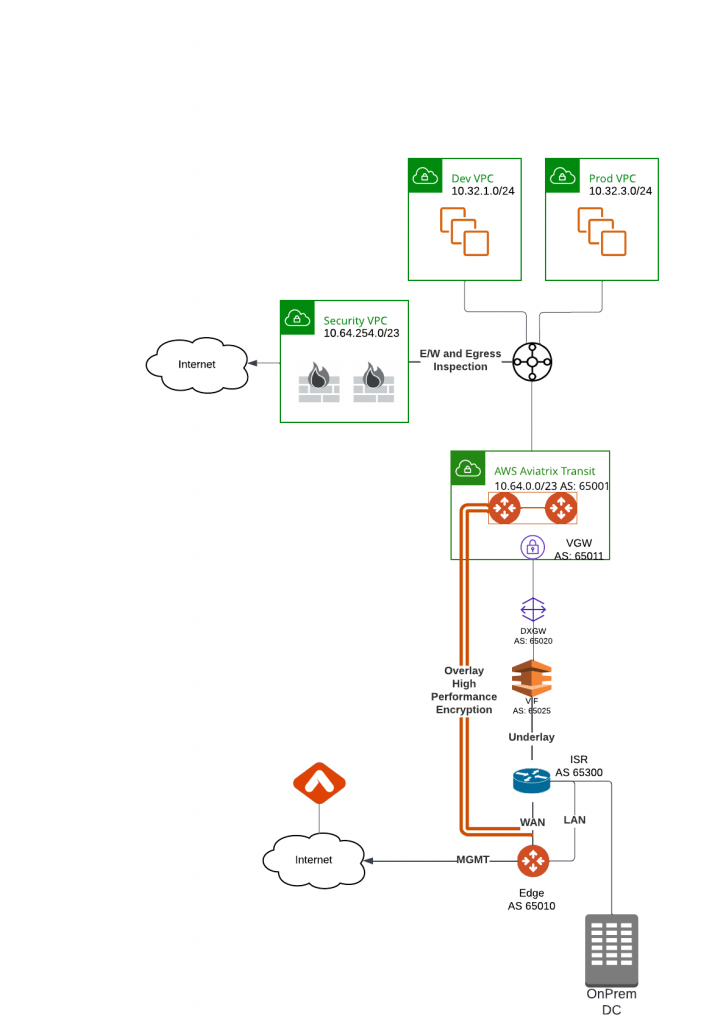
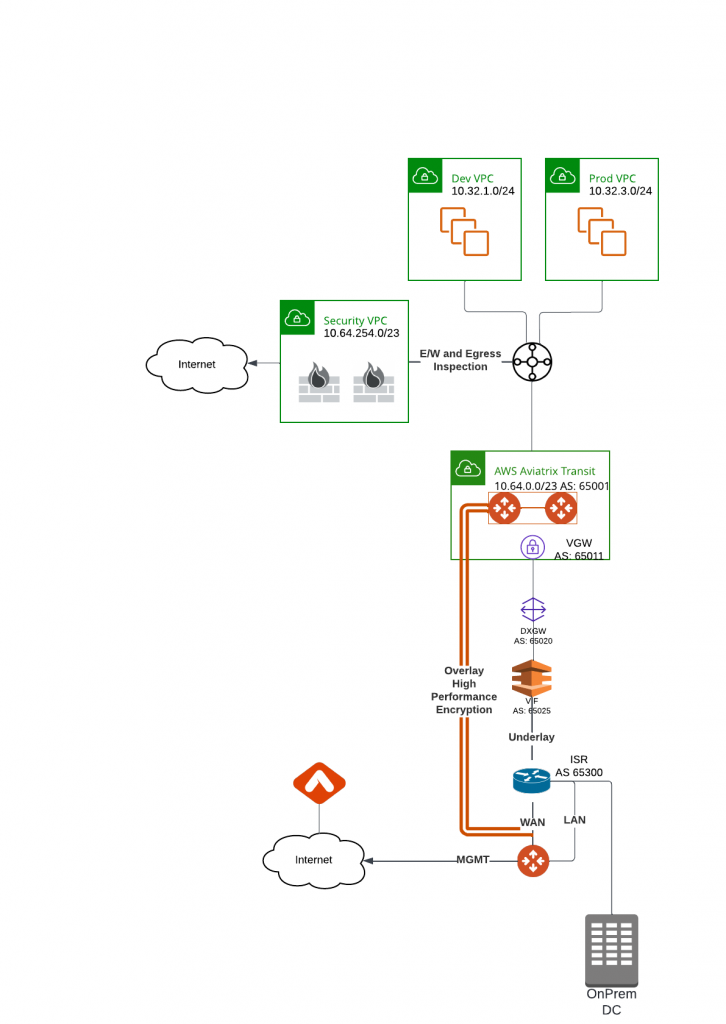
Aviatrix have several products supports HPE from edge locations: CloudN (Physical form factor), Edge 1.0 and Edge 2.0 (Virtual and physical form factor). They can be deployed on-premise data center, co-location, branch offices or retail locations. These edge devices enable customer enterprise grade visibility and control, monitoring and auditing and troubleshooting capability, as well as providing unified architecture for all major Cloud Service Providers. These solutions enable us easily push all the goodies Aviatrix Transit and Spoke architecture from the clouds towards on-premise.
In this blog, we will focus on how CloudN is deployed and connect to Aviatrix Transit. Here below is the architecture diagram:
In the last blog post: Express Route to Aviatrix Transit – Option 1, we have discussed how to use BGP over IPSec as overlay from customer on-premise devices to Aviatrix Transit Gateways. This solution have these two constrains:
Each IPSec tunnel have 1.25G throughput limit
Azure only support IPSec, not GRE as tunneling protocol
For customer have larger ExpressRoute circuit such as 5Gbps or 10Gbps and above, but doesn’t have encryption requirement or on-premise devices isn’t capable IPSec, option 1 isn’t ideal. In this blog, I will discuss the architecture to connect to Aviatrix Transit and utilize the full ExpressRoute bandwidth.
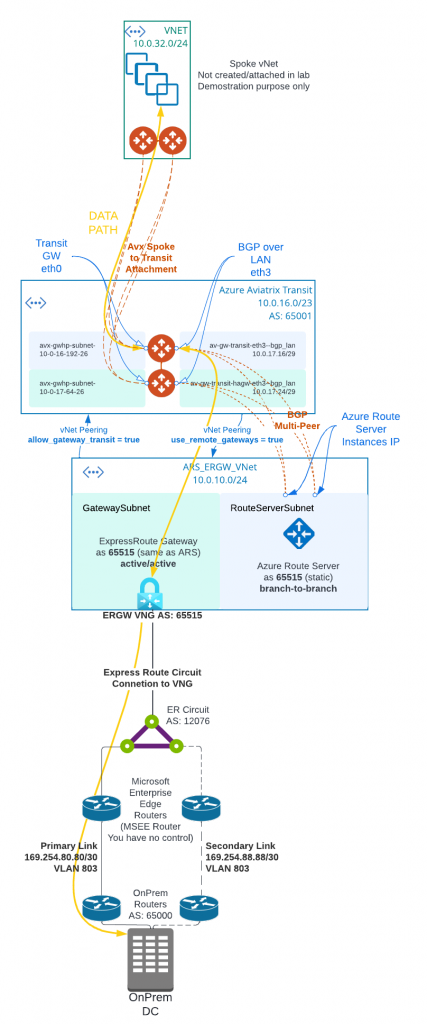
In following architecture diagram:
Aviatrix Controller must be 6.8 and above to support Multi-Peer BGPoLAN for Azure Route Server. Azure Route Server require full-mesh peering to avoid single point of failure, which would result in black-hole in traffic flow.
Aviatrix Transit Gateway must have Insane Mode (High Performance Encryption HPE) enabled, as well as BGP Over LAN enabled.
Aviatrix Controller allows “Propagate gateway route”, only on the BGP over LAN interface subnet route table.
Instead of deploying ExpressRoute Gateway (ERGW) inside of Aviatrix Transit vNet, we need to create a separate vNet to house ERGW and Azure Route Server (ARS)
When native vNet peering been used between Spoke to Aviatrix Transit, if ARS is in the same Aviatrix Transit vNet, traffic from spoke to on-premise will bypass Aviatrix Transit gateway, as more specific route from on-premise will be inserted by ERGW point to ERGW, where Aviatrix programs less specific RFC1918 routes point to Aviatrix Transit
This would apply also to HPE enabled Aviatrix Spoke, as when HPE is enabled, native vNet peering is been used as underlay to build multiple tunnels between Aviatrix Spoke Gateway to Aviatrix Transit Gateways.
From Aviatrix Transit vNet created a vNet peering with ARS_ERGW_VNet, and enabled use_remote_gateways. This will enable ERGW to propagate learned route to Transit vNet
From ARS_ERGW_VNet vNet created a vNet peering with Aviatrix Transit vNet, and enabled allow_gateway_transit.
vNet peering is subject to $0.01 per GB for both inbound and outbound data transfer.
Multi-hop eBGP is enabled between ARS and Aviatrix Transit Gateway
ARS requires dedicated RouteServerSubnet subnet, /27 or above, cannot have UDR or Network Security Group (NSG) attached
ERGW requires dedicated GatewaySubnet subnet, /27 or above, cannot have UDR or Network Security Group (NSG) attached
Branch to Branch must be enabled on ARS to exchange routes between ARS and ERGW
ARS Support 8 BGP peers, each peer support up to 1000 routes
ARS can only exchange up to 200 routes with ERGW
ARS is a route reflector, and it’s not in traffic path.
ARS Cost: $0.45USD/hour or $324 USD per month, and for a service that’s not in data path, it’s not cheap
When you create or delete an Azure Route Server from a virtual network that contains a Virtual Network Gateway (ExpressRoute or VPN), expect downtime until the operation complete. Reference Link
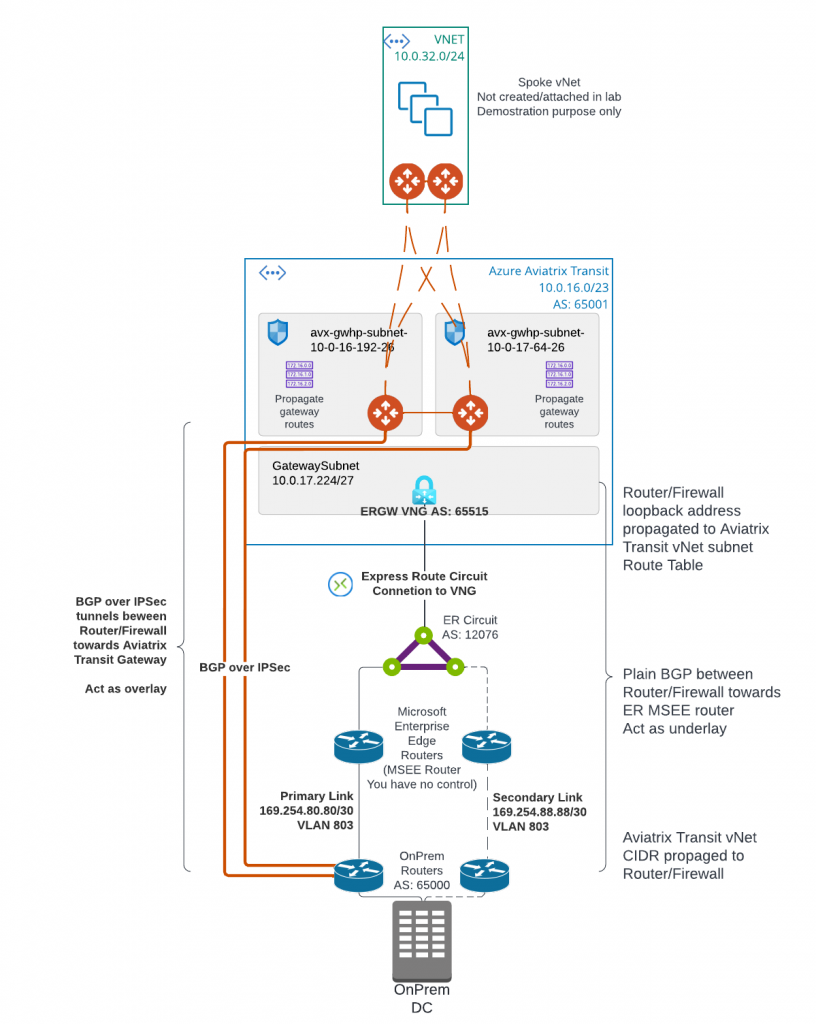
Today we are starting to discuss first of three options to connect on-premise to Aviatrix Transit. This architecture allows you to use existing IPSec and BGP capable networking device to connect to Aviatrix Transit. I’ve listed brief steps and constrains highlighted
Create ExpressRoute (ER) Circuit
Configure Azure Private BGP Peering from the ER Circuit to On-Premise device
Deploy Aviatrix Transit vNet and Transit Gateways
Create GatewaySubnet for ExpressRoute Gateway (ERGW) in Aviatrix Transit vNet and deploy Express Route Gateway
Create ER Connection between the ER circuit and ERGW
Validate BGP route propagated to Aviatrix Transit Gateway eth0 subnet route table and connectivity. This connectivity will act as underlay
Create BGP over IPSec tunnels from on-premise device towards Aviatrix Transit Gateways as overlay to exchange on-premise routes with cloud routes
Each IPSec tunnel have 1.25G throughput limit
Azure only support IPSec, not GRE as tunneling protocol
Maximum number of IPv4 routes advertised from Azure private peering from the VNet address space for an ExpressRoute connection is 1000. But since we are using BGP over IPSec overlay, we can bypass this limit.