When working with your customer or partners, often time you will need to exchange files. Sending files via email might not be as secure. If you have an Azure subscription and you may utilize Azure Storage Account SFTP feature to allow secure file transfer.
Create Azure Storage Account
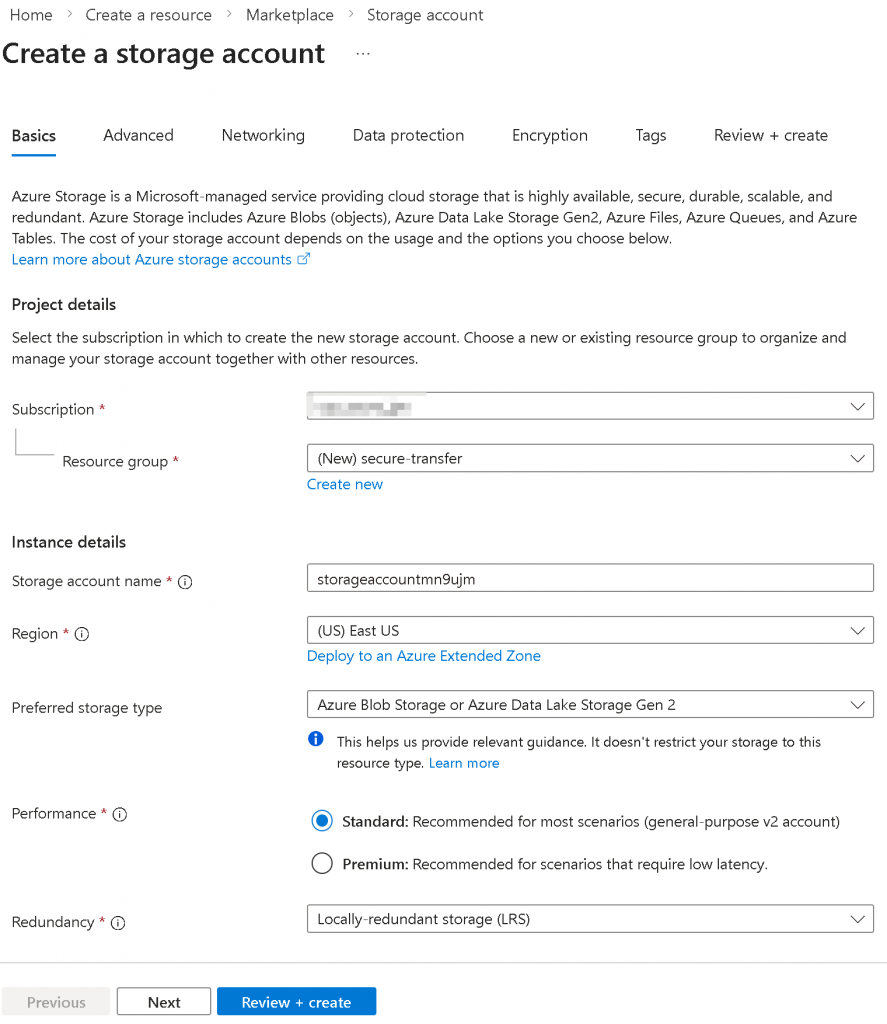
In following example, I’m creating a Azure Blob Storage or Azure Data Lake Storage Gen 2 LRS storage account storageaccountmn9ujm in East US, click on next
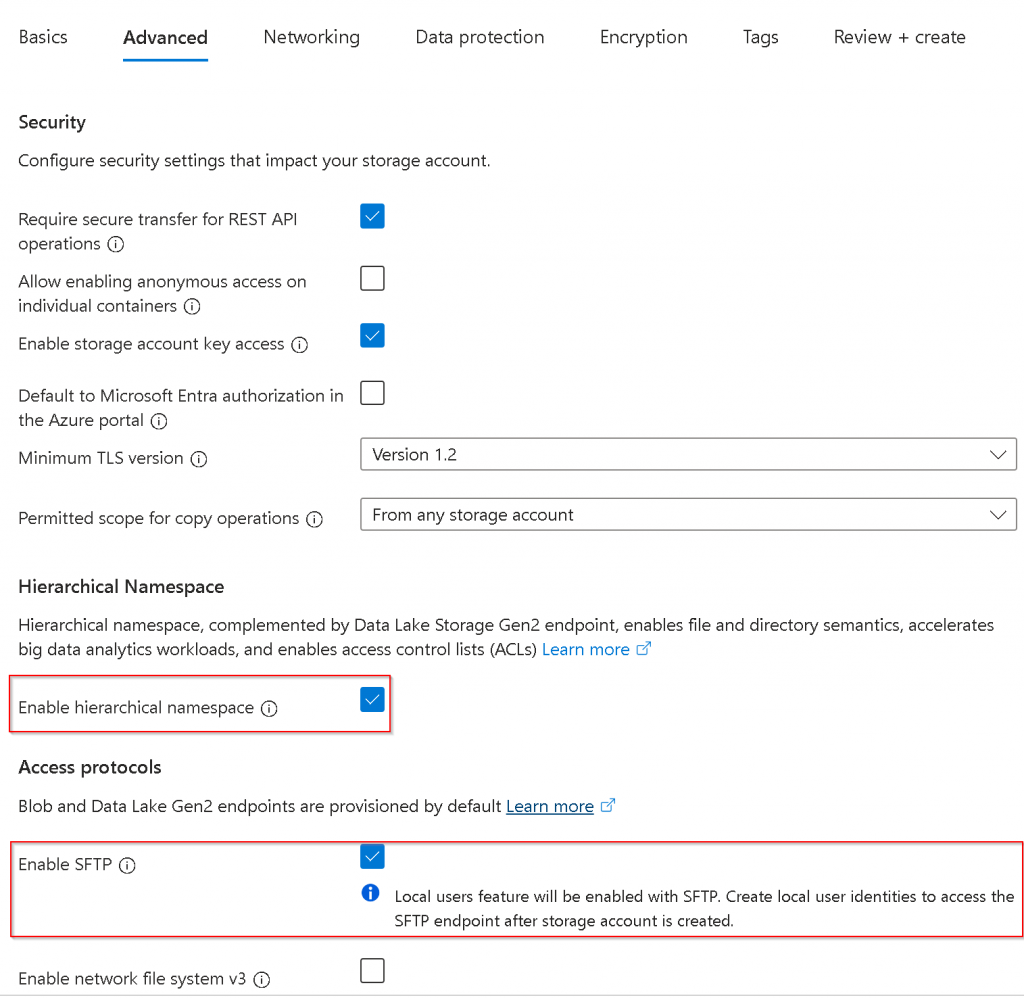
In the Advanced tab, select Enable hierarchical namespace, then select Enable SFTP
Select Review and Create
Create local SFTP account and assign permission
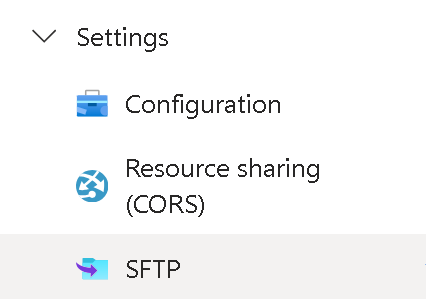
Once the storage account is created, go to the storage account -> left side panel -> Settings -> SFTP
Click Add local user
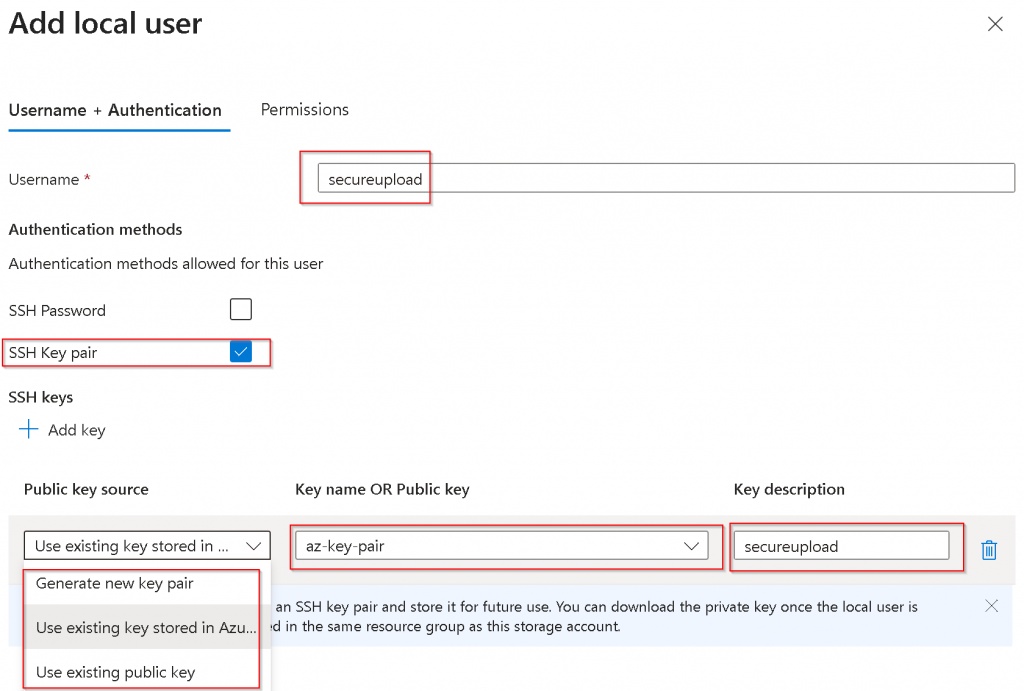
Specify Username I’d pick SSH Key pair over SSH password for additional security You have a choice to either
Generate new key pair
Useful when you intend to use this SFTP for yourself, and you didn’t already have a key pair, Azure will generate public key and private key, it will store the public key, and prompt you to download the private key
Use existing key stored in Azure
Useful when you already have key pairs, and uploaded the public key into Azure. Since I already have public key uploaded, I’m selecting this option for demo purpose
Use existing public key
You may ask your customer / partner of their public key, then enter in Key name OR Public key section
Always remember to provide a description to the key for future references
Switch to Permissions tab
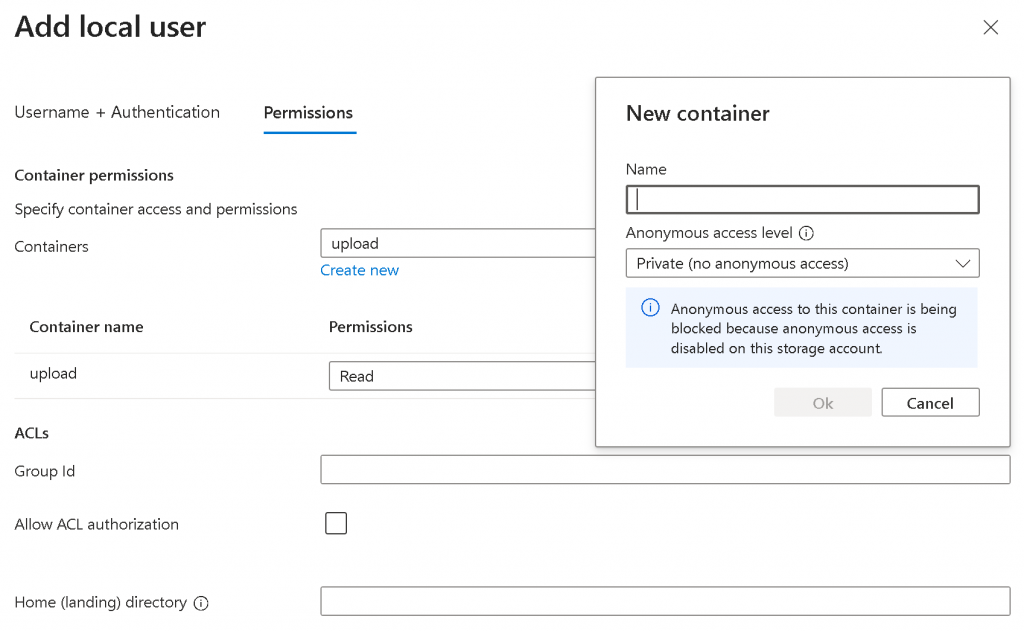
First Containers -> Create new -> Create a container for storing the uploaded files. Note, by default the container is Private
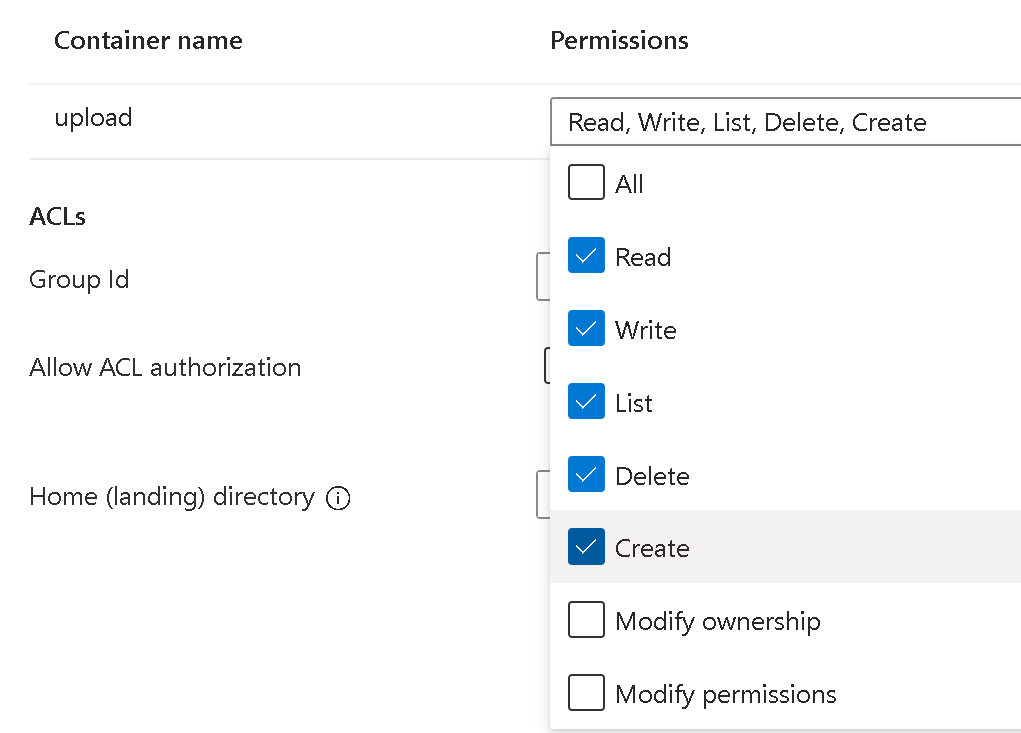
Give permission to the local user for the container.
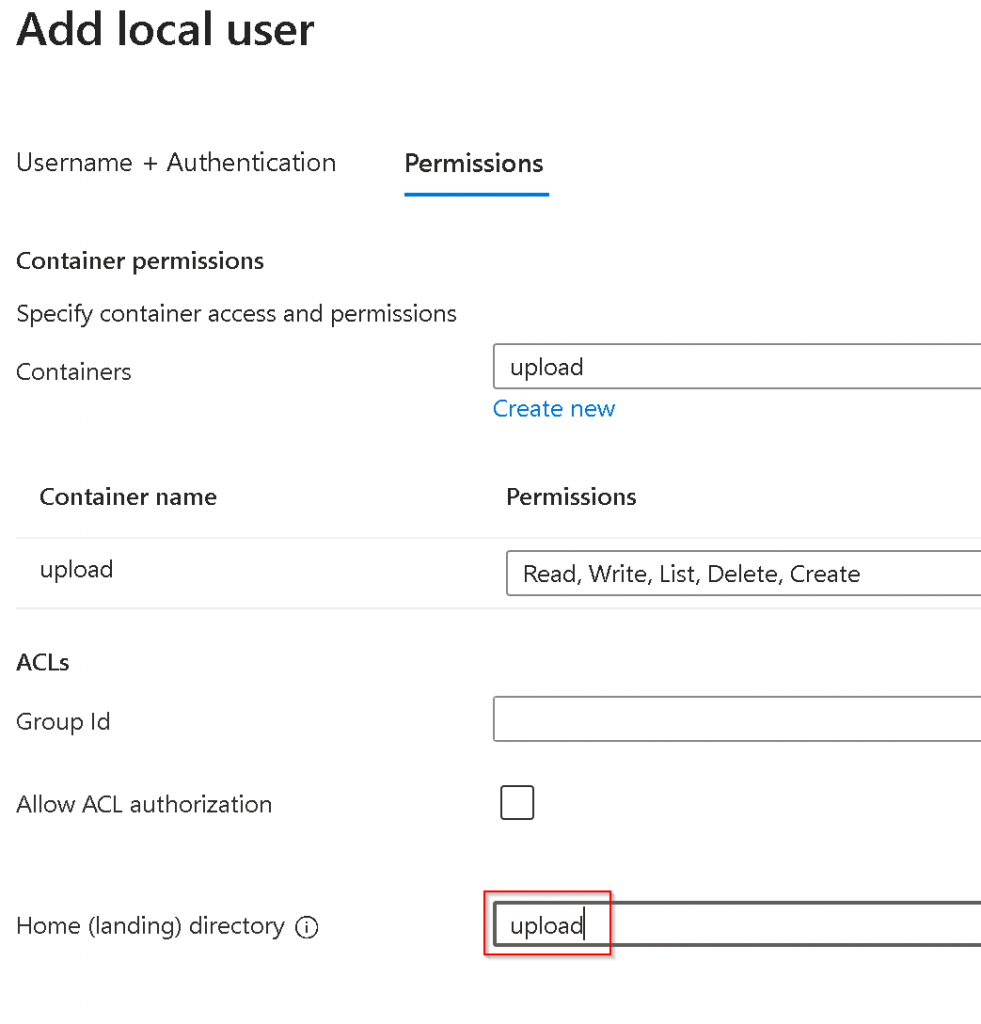
If you want the user to go directly to your container, then specify the container name as the Home (landing) directory
Click on Add, you will see the local user gets created, pay attention to the Connection String
How customer / partner upload files
You will need to provide Connection string to your customer / partner, in my example: storageaccountmn9ujm.secureupload@storageaccountmn9ujm.blob.core.windows.net
Customer / partner will then goes to command prompt
sftp -i <private_key> <connection_string>
For example below, after add the new connection to list of known hosts, you will be at sftp> prompt
To send a file
put <local_file_path> <remote_file_name>
Validate file uploaded
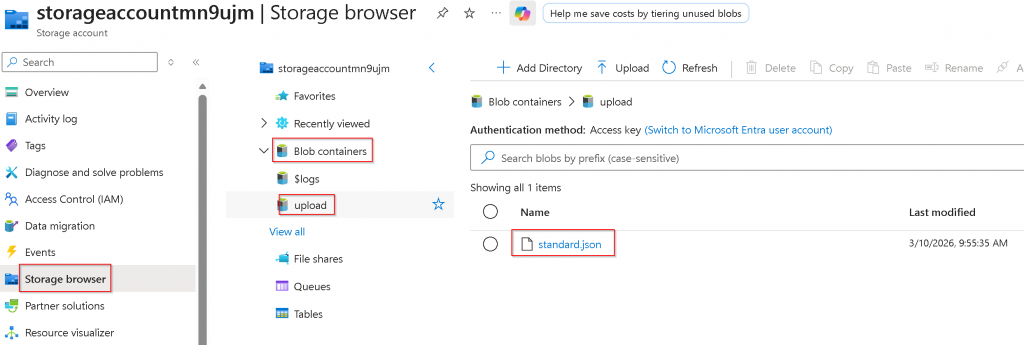
Storage account -> Storage browser -> Blob Containers -> <container> -> check if the file is there
In Azure/AWS when you are peering two vNets/VPCs, each end will automatically learn the opposite side CIDR ranges assigned to vNets/VPCs subnets. It will not bring over User Defined Route (UDR) in Azure , neither will it bring over the static/propagated routes in AWS.
In GCP VPC peering, it has this very interesting export/import feature that enriches what routes can be exposed across VPC peering, and it can be confusing for people come from Azure/AWS background, and hope this blog will help to clarify this export/import feature, as well as potential gochas.
Lab setup
In this example, I’m creating two VPCs
producer-vpc (services will be running in this producer-vpc, such as Cloud SQL or Filestore)
consumer-vpc1 (this VPC hosts VM or GKE cluster that consumes services provided by producer-vpc)
producer-vpc configuration
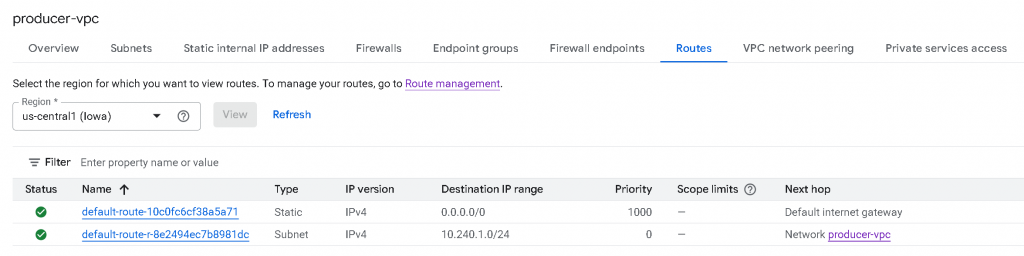
producer-vpc only have a single subnet with CIDR 10.240.1.0/24 assigned
producer-vpc now only have two active routes: 0/0 -> Internet Gateway, type static, untagged (Scope limits column empty), priority 1000 (For internet egress) 10.240.1.0/24 -> Network producer-vpc, type subnet, untagged (Scope limits column empty), priority 0. (Local routes for it’s own subnets)
consumer-vpc1 configuration
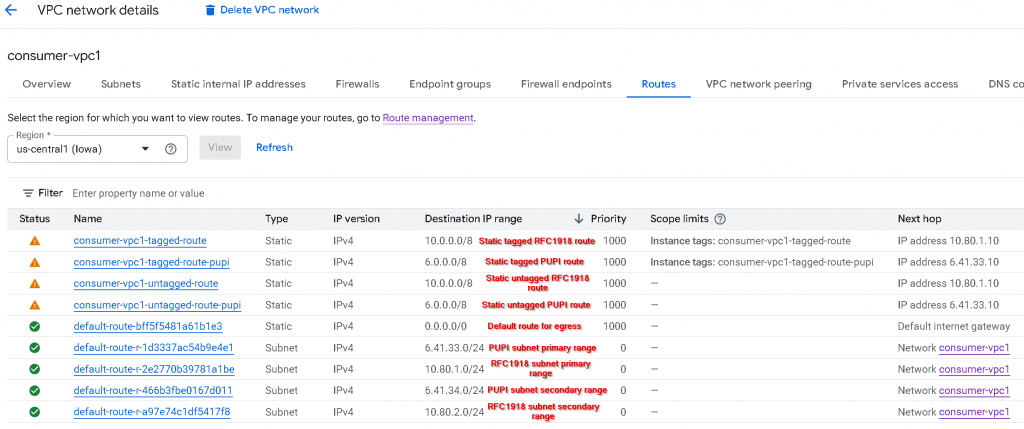
In consumer-vpc1, I have created two subnets, each subnet also assigned secondary IP range (for services that might use secondary IPs, such as GKE pods), also I’ve used IP address that either fall within RFC1918 (10.0.0.0/8, 172.16.0.0/12, 192.168.0.0/16), or Non-RFC1918 address range 6.0.0.0/8
pupi-subnet1 primary IP range: 6.41.33.0/24, secondary IP range: 6.41.34.0/24 rfc1918-subnet1 primary IP range: 10.80.1.0/24, secondary IP range: 10.80.2.0/24
You might have noticed this name: PUPI, it refer to: Privately Used Public IP. Meaning you are using a public IP range for private use. More to come on this.
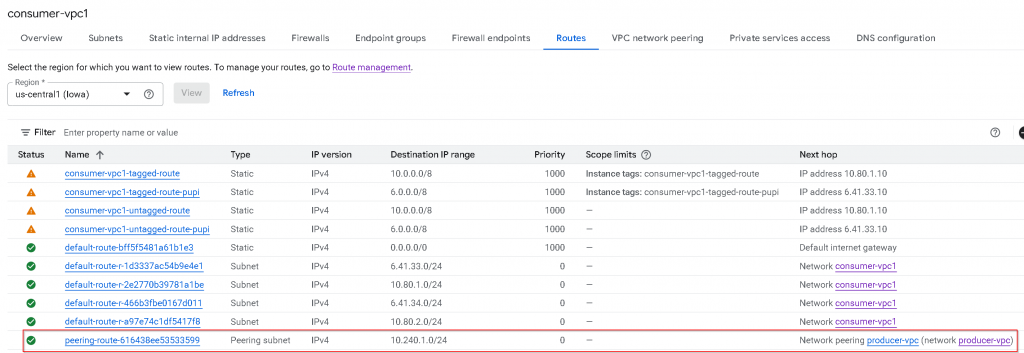
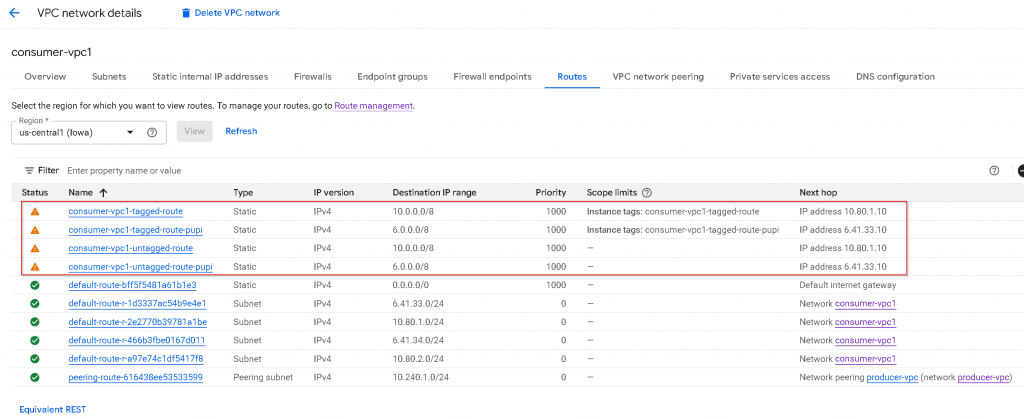
These are the route tables of consumer-vpc1: The top 4 rows are static routes added by me. It has a mixture of Static tagged RFC1918 route, Static tagged PUPI route, Static untagged RFC1918 route, Static untagged PUPI route. The 5th row is default route for egress The 6th to 10th are subnet routes that are: PUPI subnet primary IP range, RFC1918 subnet primary IP range, PUPI subnet secondary IP range, RFC1918 subnet secondary IP range
VPC peering
We will need to create VPC peering from consumer-vpc1 -> producer-vpc Then we will have to create the reverse VPC peering from producer-vpc -> consumer-vpc1
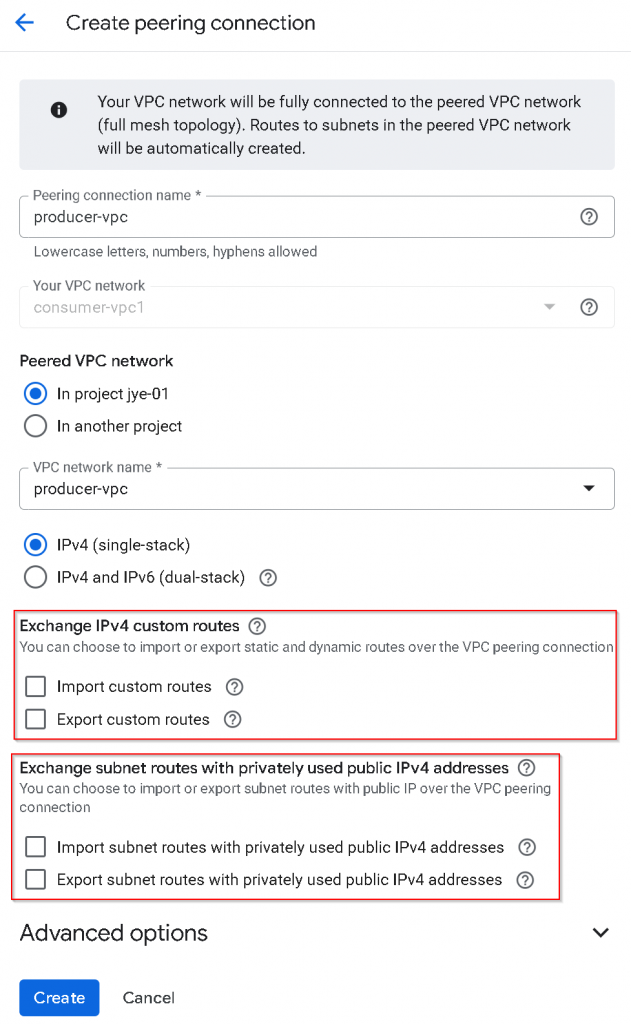
For the VPC peering from consumer-vpc1 -> producer-vpc, I’ve unchecked Exchange IPv4 custom routes, also unchecked Exchange subnet routes with privately used Public IPv4 address
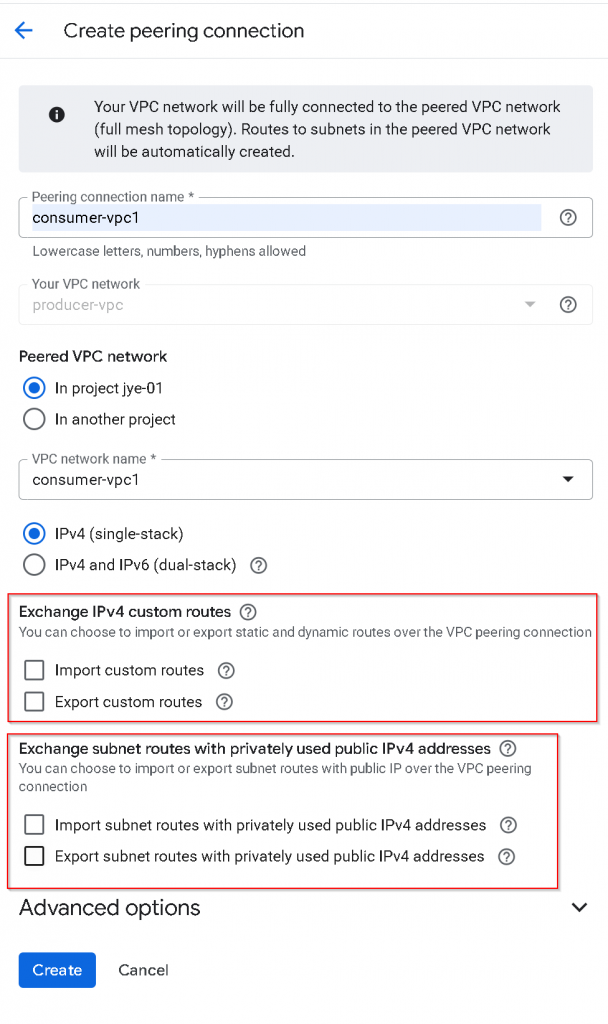
Do the same to create the reverse VPC peering from producer-vpc -> consumer-vpc1
Observe route tables after initial VPC peering
After the status of both VPC peerings turned to Active
In consumer-vpc1, we can see type: Peering subnet, destination 10.240.1.0/24, priority 0, untagged, next hop -> Network peering producer-vpc
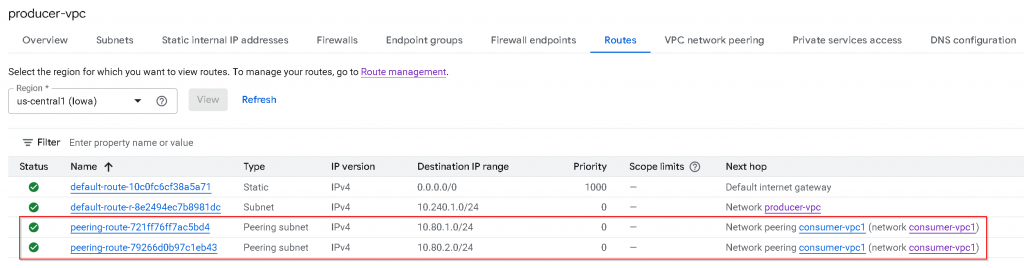
In producer-vpc, we can see only RFC1918 subnet routes shows up as Peering subnet. The PUPI subnets routes didn’t show up.
As a reminder, this is the subnets CIDR assignment for consumer-vpc1, the 6.41.x.x routes didn’t get added to producer-vpc route table via VPC peering.
Export / Import “Subnet routes” with PUPI
To allow “Subnet routes” that are using PUPI, eg, the pupi-subnet1 that are using 6.41.33.0/24 and 6.41.34.0/24 addresses to be exported to producer-vpc:
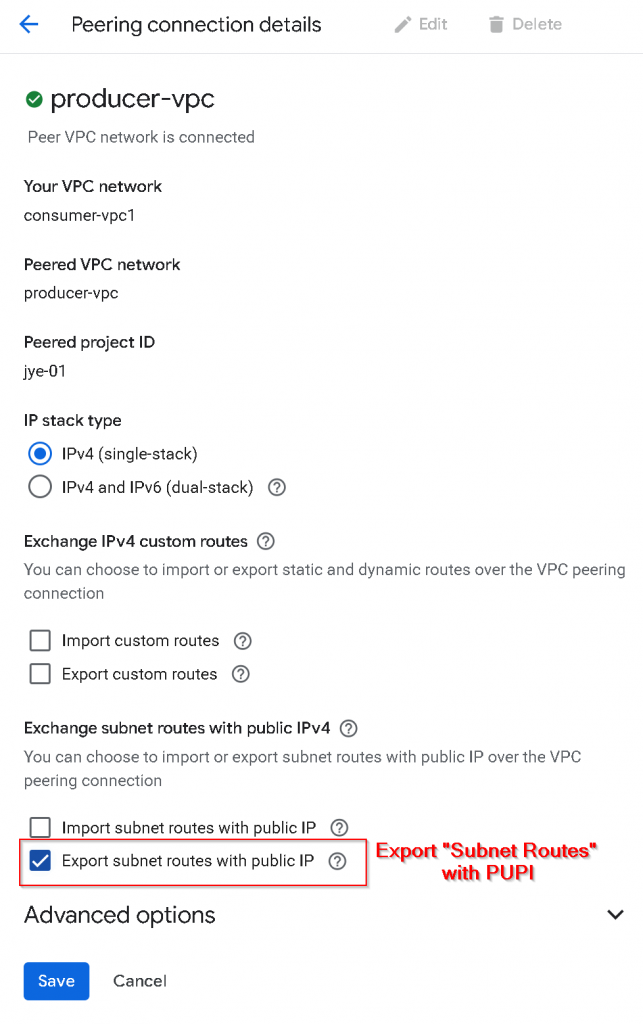
First, update VPC peering from consumer-vpc1 -> producer-vpc, check “Export subnet routes with public IP“, or I’m referring it to Export “Subnet routes” with PUPI
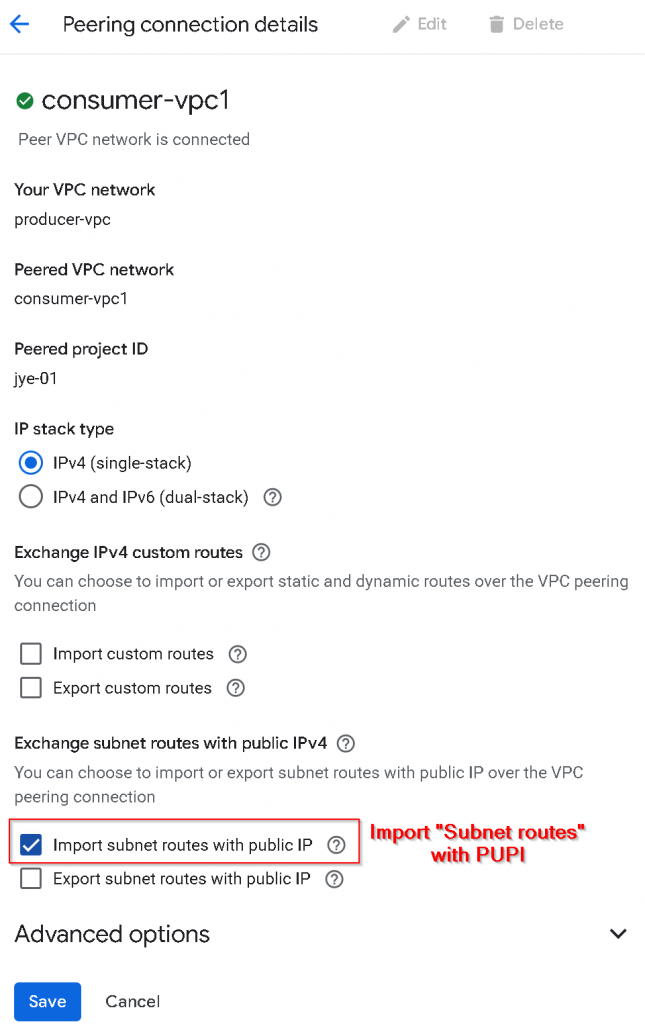
2nd, update VPC peering from producer-vpc -> consumer-vpc1, check “Import subnet routes with public IP“, or I’m referring it to Import “Subnet routes” with PUPI
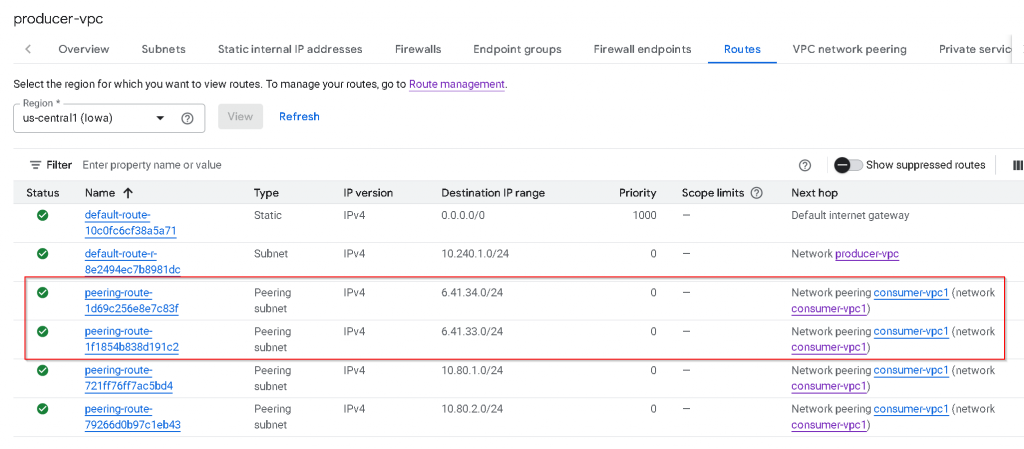
Check producer-vpc route table, now we can see PUPI subnets 6.41.x.x show up as peering subnet routes.
Why this is important?
Coming from Azure/AWS, the assumption is that peering VPCs will automatically learn all subnet routes across the peering connection. In GCP, this isn’t the case. You will have to enable “Export/Import subnet routes with public IP“, or I’m referring it to Export/Import “Subnet routes” with PUPI, to have the same effect.
When you are using PUPI in your consumer VPC as you ran out of RFC1918 ranges, when you are connecting to PaaS services such as Cloud SQL, Filestore, you need to make sure Export/Import “Subnet routes” with PUPI is enabled on the VPC peering connection.
What is “Custom routes”
1. Static Routes
These are manually created by you. You define a destination CIDR range and a “next hop” (where the traffic should go).
Common Use Case: Sending traffic through a third-party firewall appliance or a VPN gateway.
Next Hops: Can be an IP address, a specific VPN tunnel, or a VM instance.
2. Dynamic Routes
These are managed by Cloud Router using the BGP (Border Gateway Protocol). You don’t type in the paths manually; instead, your VPC “learns” them from another network.
Advantage: If a link goes down, the route updates automatically without you needing to click anything.
Common Use Case: Connecting your on-premises data center to GCP via Cloud Interconnect or Cloud VPN.
Export / import custom routes
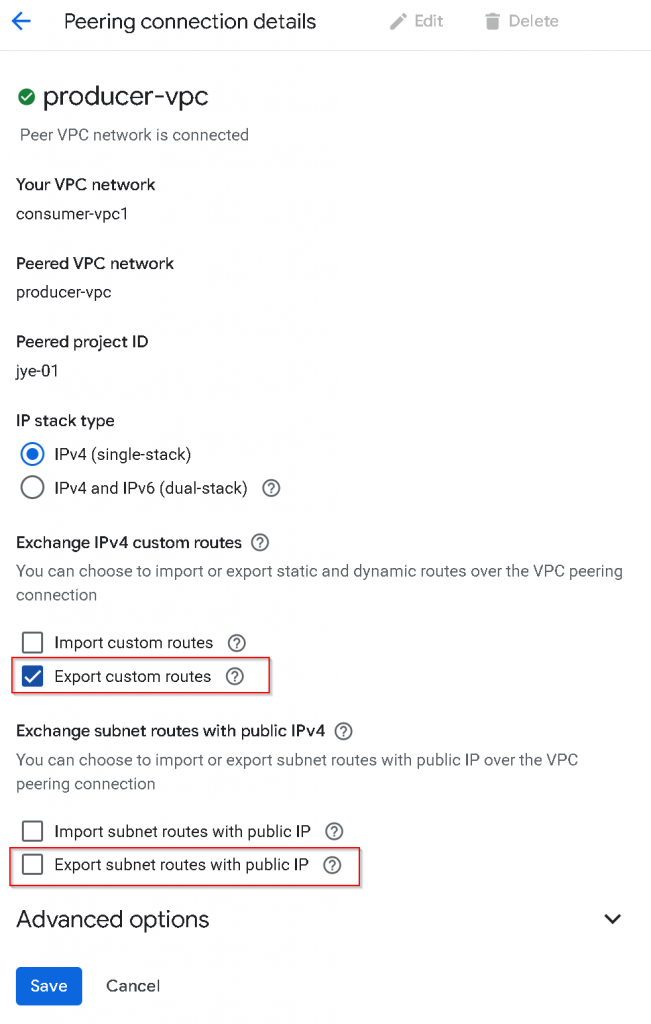
First, update VPC peering from consumer-vpc1 -> producer-vpc, uncheck “Export subnet routes with public IP“, or I’m referring it to Export “Subnet routes” with PUPI, check “Export custom routes
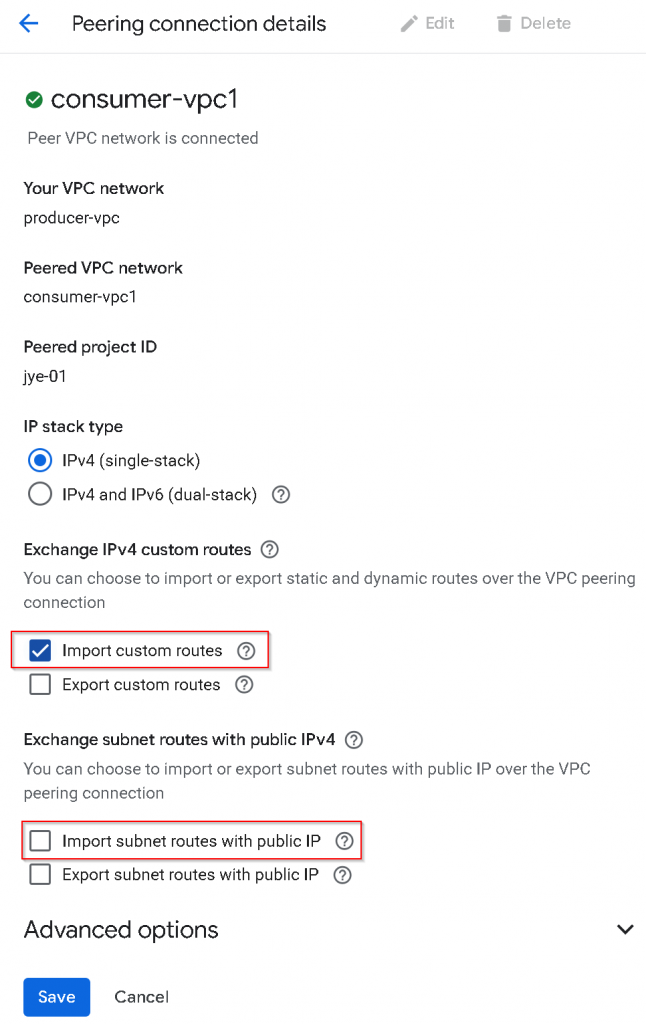
2nd, update VPC peering from producer-vpc -> consumer-vpc1, uncheck “Import subnet routes with public IP“, or I’m referring it to Import “Subnet routes” with PUPI, check “Import custom routes“
After setting is applied, consumer-vpc1 export custom routes, and producer-vpc import custom routes.
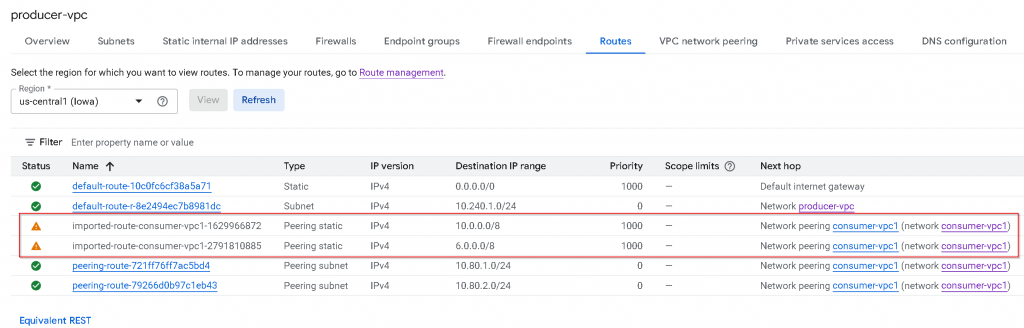
Now check producer-vpc route table
Comparing with consumer-vpc1 route table. You will notice:
All *untagged* custom routes (static in the example, dynamic route not shown) are imported
Untagged Custom route with PUPI 6.0.0.0/8 also got imported
Tagged custom routes are *not* exported / imported
Default internet gateway routes are *not* exported/imported
Note: Policy-based routes (PBR) will *not* exported /imported (not shown in the example)
Why this is important?
Allowing untagged custom routes to be exported can allow traffic to be directed to a routing device across VPC peering, this routing device can be Cloud Router, Firewall etc.
Be careful when you are using 0/1 or 128/1 untagged custom routes in your consumer VPC, as when you are peering with producer VPC and exchanging custom routes, the 0/1 or 128/1 untagged custom routes may get imported into producer VPC, which may break PaaS services internet egress
Wrapping up
Export / Import custom routes are used for Custom routes such as static/dynamic routes, regardless if it’s using PUPI or not.
“Export/Import subnet routes with public IP” are targeting Subnet routes that are using PUPI, it has nothing to do with Custom routes.